
Career
Top AI Courses in Kerala for a Better Career in 2026-2027
The best AI course in Kerala depends on your goal and your qualification. After 12th or with any degree even an unfinished one, start with a short applied AI course...
Read more
How to create AI videos as a beginner: the complete workflow from idea to published Reel, the tools worth learning, what it really costs, the rules you must follow, and how to turn the skill into work.
Last updated 25 October 2026. AI video tools change every few months, so we review this guide regularly.
Want to create professional-looking videos without a camera, studio or years of editing experience? AI video tools now turn text, images and ideas into short videos, Instagram Reels, YouTube Shorts and marketing creatives.
But a useful AI video takes more than typing a prompt and clicking Generate. You need a clear idea, a script, visual planning, the right tools, editing, and an understanding of what makes people keep watching.
Whether you are a beginner, digital marketer, content creator, freelancer or business owner in Kerala, this guide explains how to start creating AI videos in 2026-27, which tools to learn, what they cost and how to turn the skill into practical opportunities.
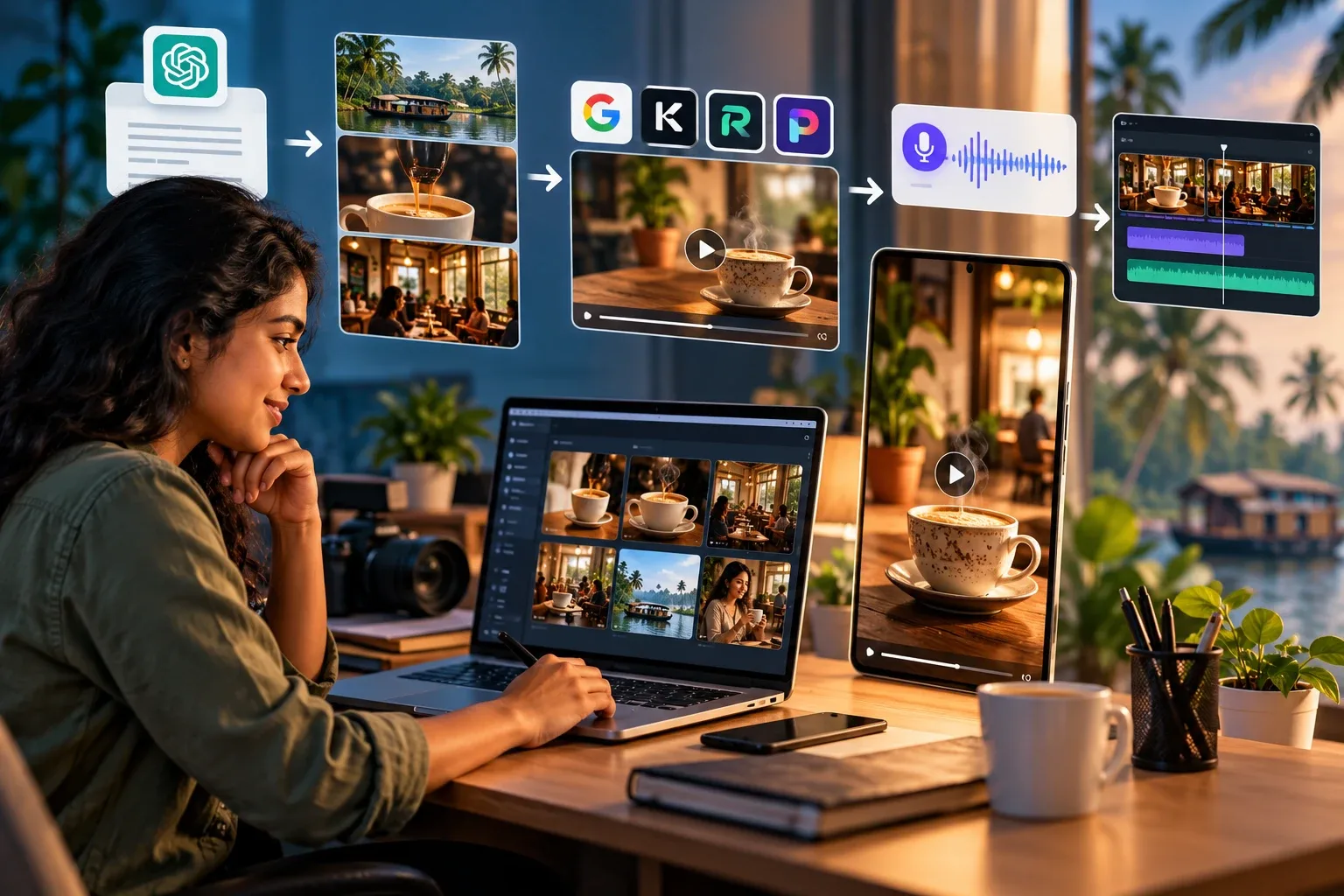
To create an AI video, choose a topic, write a short script, plan the scenes, generate visuals with an AI video tool, add a voiceover or music, and edit the clips into a finished video. Beginners can use ChatGPT, Claude or Gemini for scripts, Google Veo, Kling AI or Runway for video generation, ElevenLabs for voiceovers, and a video editor for captions, sound and export.
The basic workflow has six stages:
You do not need to learn every AI video generator. You need to understand how these six stages work together.
AI video creation is the use of artificial intelligence to generate, transform or assist in producing video content. Generative video models create moving visuals from written descriptions, reference images or other inputs. There are five main approaches.
You describe a scene, and an AI video model generates moving visuals from your instructions. For example:
A cinematic aerial shot of a traditional Kerala house surrounded by coconut trees, early morning mist, soft natural lighting and a slow forward camera movement.
The model interprets the description and attempts to produce the scene.
You provide a still image and tell the AI how to animate it. For example, you upload an image of a coffee cup and ask for rising steam while the camera moves slowly towards the cup. Image-to-video gives you more control over the starting composition than generating everything from text.
AI helps with captions, audio cleanup, background removal, speech translation and resizing clips for different platforms. It speeds up editing, but it does not replace editing decisions.
AI speech tools turn written scripts into narration. Some support Malayalam and other Indian languages, although pronunciation and naturalness vary from tool to tool.
A full workflow combines several of these. A creator might use one tool for the script, another for visuals, a third for narration and a video editor to assemble everything.
The important skill is not operating a single tool. It is managing the whole process from idea to finished video.
Yes. You can start without any background in filmmaking, design or professional editing. But basic storytelling, visual composition and editing skills matter more and more as you progress.
To begin, you need:
Cameras, lighting and studios are not required for fully AI-generated videos. However, AI does not automatically make a video professional. A poorly structured video still confuses viewers, even when each scene looks impressive.
My advice for beginners: start with a 15 to 30 second video, not a short film. Short videos let you practise scripting, generation, editing and publishing without burning through credits.
Let's work through a realistic example. A small café in Kochi wants to promote its signature coffee with an Instagram Reel. It has a limited budget and wants Malayalam narration. We will plan a 20-second vertical video.
This is an illustrative exercise. The prompts and workflow are designed for you to test in your own tools; they are not results from a finished production.
Before opening any AI tool, answer three questions: who is the video for, what should viewers remember, and what should they do next?
For our example:
A clear brief stops you from spending credits on attractive scenes that do not support the message.
AI writing assistants turn a basic idea into a structured script. Example prompt:
Act as a creative director for a Kerala-based digital marketing agency. Create a 20-second Instagram Reel concept for a premium café in Kochi. The audience is college students and young working professionals. The video should feature warm lighting, fresh coffee, a comfortable atmosphere and a short Malayalam voiceover. Provide a strong opening hook, four short visual scenes, suggested narration and a closing call to action. Avoid making unsupported claims about the café.
Treat the output as a first draft and review it for tone, timing and accuracy. A possible four-scene structure:
A sample Malayalam narration:
തിരക്കിനിടയിൽ ഒരു ചെറിയ ഇടവേള... ഒരു കപ്പ് നല്ല കാപ്പിയോടൊപ്പം. നിങ്ങളുടെ അടുത്ത കോഫി ബ്രേക്ക് ഇവിടെ ആക്കാം.
This is a starting script, not an approved advertisement. Add the café's real name, logo, address and product details only after checking them.
A storyboard is a visual plan of what happens in each shot. Even simple AI videos benefit from one:
A storyboard keeps the visual style consistent and tells you how many generations you need before you spend a single credit.
Image generators such as FLUX, Ideogram and Google's image tools create reference images and still frames. Video platforms such as Google Veo, Kling AI and Runway then turn them into short moving clips. For more consistent results, start from a carefully designed reference image. Example prompt:
Create a photorealistic advertising image of a ceramic coffee cup on a polished wooden table inside a contemporary Kerala-inspired café. Warm morning sunlight enters through large windows. Tropical greenery is visible outside. Premium commercial photography, realistic reflections, natural coffee texture, shallow depth of field, warm brown and cream color palette, vertical 9:16 composition. No text, no logos, no watermarks.
Review the image before generating any video. Check that the cup, table, background, lighting and proportions look real. If you are promoting a real café, use approved photographs of it rather than inventing an interior and presenting it as the actual place.
An image-to-video tool turns the approved still into a short animated shot. Example prompt:
Slow cinematic camera push-in towards the coffee cup. Gentle natural steam rises from the coffee. Soft morning sunlight moves across the table. Subtle background movement, stable composition, realistic physics, premium café advertisement style. Continuous shot with smooth motion.
Notice that this prompt describes only movement. The reference image already defines the cup, setting, lighting and composition. This is the approach video platforms such as Runway recommend for image-to-video: let the image set the look, and use the prompt for action, camera movement and timing.
Generate and review each shot on its own. Look for unnatural movement, objects that change shape, distorted details and sudden camera jumps. Do not accept the first result automatically.
You can record your own voice or use an AI speech tool that supports Malayalam. AI voices work well for explainer videos, product ads, faceless YouTube content, social media narration and short business promotions.
Malayalam brings its own challenges. Generated narration can mispronounce words, stress the wrong syllables or stumble on English brand names inside Malayalam sentences. Before approving an AI voiceover:
Do not assume every multilingual AI voice sounds equally natural. For a Kerala business, clear and authentic Malayalam narration usually works better than an impressive voice with awkward pronunciation.
Now combine the clips, narration, music and branding in an editor such as CapCut or DaVinci Resolve. A basic sequence:
Add the voiceover, background music and captions. Check that the video still makes sense with the sound off. Use a 9:16 frame for Reels and Shorts, and keep important text and logos away from the areas covered by platform buttons.
Most importantly, make the video feel like one connected story, not four unrelated AI clips.
Export with settings that suit the platform. For most short-form social media, 1080 × 1920 pixels is a practical vertical resolution, although some AI tools generate at lower resolutions.
Before publishing:
After publishing, review views, average watch time, retention, profile visits and enquiries. Use what you learn to improve the next video.
A video is not successful because AI made it quickly. It is successful when it achieves a real communication or business goal.
No single tool is best for every project. Different tools solve different problems, and the line-up changes often. These are the options worth understanding today, grouped by workflow stage.
My recommendation for beginners: pick one script assistant, one image generator, one video generator, one narration method and one editor. A reliable workflow with five tools beats fifteen subscriptions without a clear process.
AI can generate an impressive single shot. Creating a video people want to watch is a different task. A strong video depends on decisions about:
Compare two AI ads. The first has several stunning shots with no clear connection. The second uses simpler images but follows a clear sequence: problem, experience, product, call to action. The second usually communicates better, even though its visuals are less spectacular.
That is why beginners should study storytelling and editing alongside prompting. The AI video creation program offered through Brain Cyber Solutions and Maattam is led by Akhilrag K, a film editor and post-production specialist, so the course brings professional filmmaking judgment into AI video workflows. The aim is not just to generate clips, but to turn them into finished, meaningful content.
You can start experimenting with free or trial tools, but creating AI videos regularly usually means paying for generation credits or subscriptions.
There is no single monthly figure. Your spend depends on how many clips you generate, their length and resolution, the models you choose and how often you regenerate failed attempts.
Start with tools that offer free access or trial credits, and use them to practise scripts, storyboards, reference images, a few short clips, and editing and export. Free plans often limit resolution, clip length, commercial use, watermarks or monthly credits, so check the current terms.
Most video platforms use credits or plan limits, and better models or longer clips use more. For example, Runway's Gen-4.5 model uses 12 credits per generated second at the time of writing, so a single five-second clip uses 60 credits. Every retry costs the same again, which is why repeated attempts add up quickly.
Before generating anything:
Track your cost per approved second of video, not just your subscription price. A cheap platform becomes expensive if it takes many attempts to get one usable clip. Finish one small portfolio project before you subscribe to several services.
Often, yes. But your right to publish or monetise a particular video depends on its content, the law where you operate, the tool's licence and the platform's rules. Generating something with AI does not give you unlimited rights over every element in it. This section is general guidance, not legal advice.
Before publishing commercially:
This matters especially for creators making Malayalam entertainment content. Recreating a film actor's face, cloning a celebrity's voice or staging a realistic fictional endorsement can raise personality-rights, privacy, copyright and consumer-protection issues. AI generation does not remove those risks. For business campaigns, original concepts, licensed assets and consenting performers are the safe route.
YouTube requires creators to disclose realistic content made with altered or synthetic media, meaning content a viewer could mistake for a real person, place or event. Clearly fantastical content, animation and simple effects generally fall outside that requirement. Meta also labels AI-generated content on Instagram and Facebook and asks for disclosure of certain realistic AI content.
Not every small AI-assisted edit needs the same disclosure. Check each platform's current policy for your specific video before publishing.
AI video skills can support freelance services, marketing work, content creation and business promotion. What you earn depends on creative quality, finding clients, consistency and the value you deliver, not on knowing a tool.
Five practical directions:
The most transferable skills are scriptwriting and storytelling, visual composition, prompting, image-to-video generation, editing and sound design, audience understanding, content planning, portfolio presentation and client communication. Learning the whole process opens more doors than relying on one generator.
Use this schedule to organise your first learning project. It is a practice plan, not a promise of professional mastery.
Days 1 to 4: planning and storytelling. Learn audience research, niche selection, video structure and scriptwriting. Create three video ideas, two short scripts and one complete storyboard.
Days 5 to 8: AI image and video generation. Explore prompting, composition, image generation and animation. Create a set of consistent reference images, three short AI clips and one draft sequence.
Days 9 to 12: voice, editing and post-production. Learn narration, subtitles, transitions, sound balancing and export. Create one complete vertical Reel and one short promotional video.
Days 13 to 15: portfolio and content planning. Polish your work and organise it for presentation. Create a small creator portfolio, a documented production workflow and a basic content plan for your own brand or a sample client.
By the end, you should be able to explain how you planned, generated, edited and evaluated your own videos. Portfolio quality comes from practice and revision, not from finishing the calendar.
Learning alone is possible, but many beginners struggle to connect scripting, image generation, video production, editing and publishing into one reliable workflow. Guided practice helps.
Brain Cyber Solutions runs a 15-day live online AI Video Creation Course in Malayalam through Maattam, its AI Learning & Professional Growth Ecosystem, for Malayalam speakers in Kerala, the Gulf and the wider diaspora.
The course covers content strategy and storytelling, AI scripting and prompting, AI image generation, text-to-video and image-to-video, Reels and faceless content, Malayalam and multilingual voiceovers, editing and post-production, and personal branding with a portfolio. It is led by Akhilrag K, and includes live sessions, recordings for revision, mentor guidance and portfolio projects at the end of each phase.
On completion you earn MCAIV, Maattam Certified AI Video Creator, a certificate awarded by Maattam based on your practical projects and portfolio. It is a training credential, not a government qualification or a certification from any AI tool company.
The current batch fee is ₹6,000 + GST (regular fee ₹9,000 + GST). Fees, batches and offers can change, so confirm before enrolling.
See the 15-day AI Video Creation Course in Malayalam (MCAIV), or read the full MCAIV course details on Maattam.
The course builds practical skills and a portfolio. It does not guarantee jobs, clients, income or social media results.
Develop a short idea, write a script, create reference images, generate short clips with a video model, add a voiceover and edit the results. A 15 to 30 second project is the best way to start.
There is no universal best tool. Google Veo, Kling AI, Runway and PixVerse are all worth evaluating. Choose on output quality, features, pricing, ease of use and commercial licensing.
Partly. Many tools offer free plans or trial credits with limits on resolution, length, watermarks or commercial use. You can practise scripts, storyboards and editing cheaply, but regular high-quality generation usually needs paid credits.
No. You can start without editing experience. Learning basic trimming, timing, captions, sound and visual continuity will improve your finished videos a lot.
Yes. Combine AI visuals with a Malayalam script and either your own recorded narration or a multilingual AI voice tool. Check pronunciation carefully, especially names, dialect expressions and sentences that mix Malayalam and English.
Choose a subject, research it, write an original script, prepare visuals, add narration, edit and publish with good titles and descriptions. Follow YouTube's rules on originality, monetisation and AI-content disclosure.
It can support work in digital marketing, advertising, content production, education and freelancing. Practical skill, a strong portfolio and the ability to solve client problems matter far more than knowing individual tools.
Brain Cyber Solutions runs a 15-day live online AI Video Creation Course in Malayalam under the Maattam brand. The MCAIV program covers storytelling, AI visuals, voiceovers, editing, Reels, faceless content and portfolio projects.
MCAIV stands for Maattam Certified AI Video Creator. It is a training credential awarded by Maattam for completing the course's practical projects and portfolio. It is not a government qualification or a certification issued by an AI tool provider.
Not necessarily. Most AI generation tools run in the cloud, so a basic computer and reliable internet are enough to start. Heavier local editing and high-resolution work benefit from stronger hardware.
AI video tools will keep changing. New models will launch, prices will move, and today's favourite generator may be replaced next year. The workflow will not change: a clear goal, a tight script, a planned sequence of shots, careful generation, honest narration, thoughtful editing and responsible publishing.
Start small. Make one 20-second video for a real purpose, review it critically, and make the next one better. Once you can take an idea all the way to a finished, useful video, you can pick up any new tool in days.
If you would like guided practice in Malayalam, with a film editor reviewing your work, explore the MCAIV course.
Related reading: Top AI courses in Kerala for 2026-2027, comparing fees, duration and eligibility, and Instagram marketing in Kerala for getting your videos seen.
Career
The best AI course in Kerala depends on your goal and your qualification. After 12th or with any degree even an unfinished one, start with a short applied AI course...
Digital Marketing References
What is Instagram Marketing? Instagram marketing refers to using Instagram to promote brands, products, or services through organic and paid strategies. Businesses...

Career
Social media marketing in Kerala is evolving fast. Businesses, influencers, and digital marketers need to stay ahead of trends to remain competitive. In 2025 and 2026...
Send us a short message. We are happy to talk it through.